 Janis Arnold
Mini Arcade – Our own arcade machine

%22%2F%3E%3Ctext%20x%3D%2232%22%20y%3D%2242%22%20text-anchor%3D%22middle%22%20font-family%3D%22system-ui%2C%20sans-serif%22%20font-size%3D%2226%22%20font-weight%3D%22600%22%20fill%3D%22%23f9a8d4%22%3EL%3C%2Ftext%3E%3C%2Fsvg%3E)
%22%2F%3E%3Ctext%20x%3D%2232%22%20y%3D%2242%22%20text-anchor%3D%22middle%22%20font-family%3D%22system-ui%2C%20sans-serif%22%20font-size%3D%2226%22%20font-weight%3D%22600%22%20fill%3D%22%236ee7b7%22%3EL%3C%2Ftext%3E%3C%2Fsvg%3E)
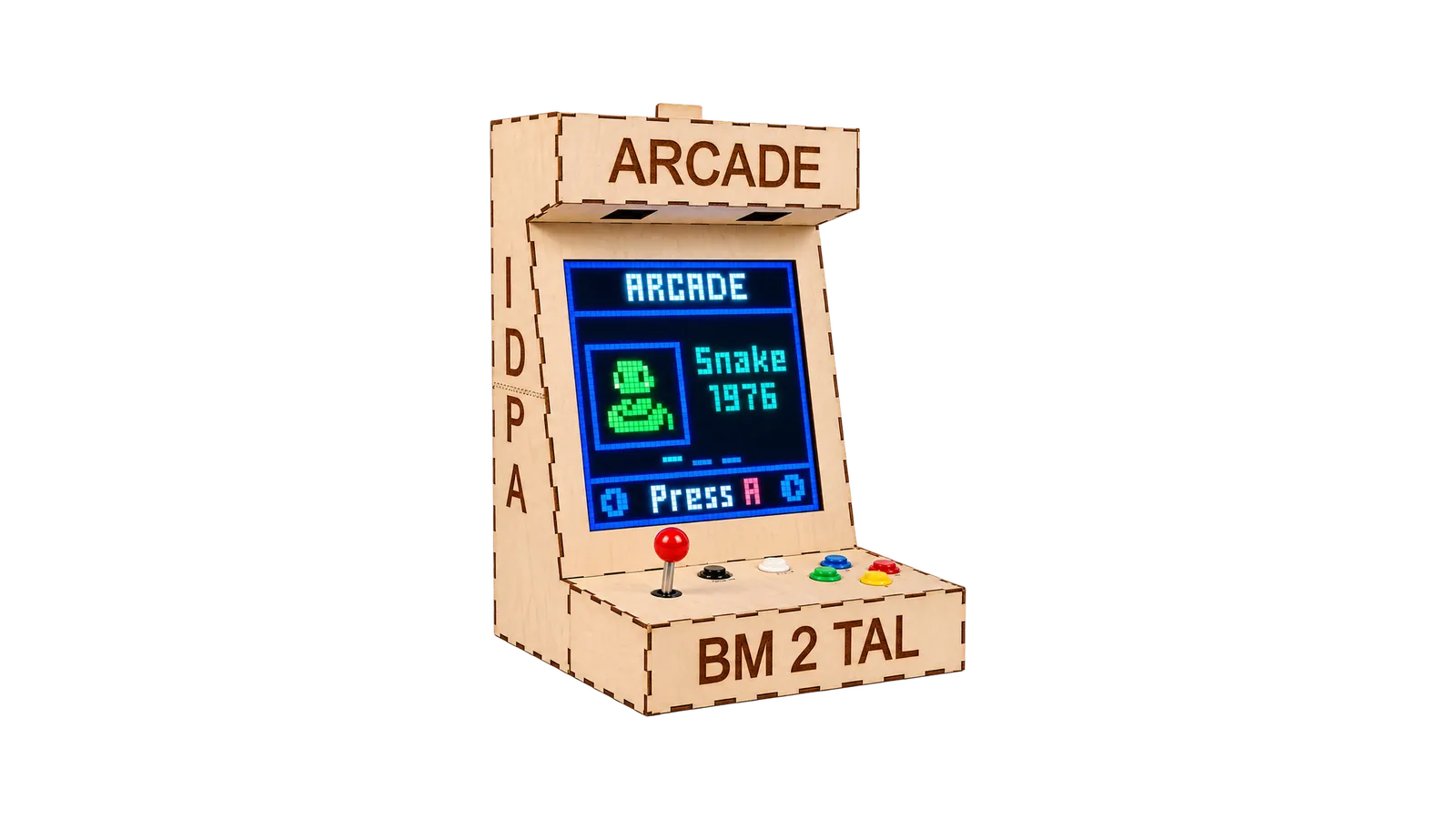
For our final school project, the three of us built our own mini arcade machine. From the electronics to the software to the cabinet, we planned and built everything ourselves.
The special part is the display. Instead of a normal screen we used a 48 × 48 LED matrix with 2,304 individually addressable RGB LEDs, driven by a Raspberry Pi Pico 2 W. Several games run on it directly on the hardware.
The full source code is on GitHub.
The system
The project has three parts: electronics, software and cabinet. I took care of the software, Luca did the cabinet and Luka the electronics. The electronics connect the microcontroller to the display, buttons and speakers. The software handles the input and draws the menu and games. And the cabinet puts it all together in the end.
Software
The software is the heart of the machine. Instead of writing a separate program for every game, we built a small arcade operating system. When you switch it on, the main menu starts right away, and from there you control everything with the joystick and buttons.
Games
Among others, it has Snake and Space Invaders. In Snake you steer the snake with the direction keys, in Space Invaders you move the ship and shoot with the A button. The controls work the same way as in the menu. The low resolution isn't a downside, it's part of the look. The games were made specifically for 48 × 48 pixels.
Menu, settings and sound
In the settings app you can change brightness, volume and sound right on the device, turn on developer mode or reset everything. Settings and high scores are saved and survive a restart.
There are sound effects too. A shot, a hit or the snake eating something triggers an event like snake_eat or space_invaders_player_shoot. A central audio service plays the sound, so the games themselves don't need to know anything about the audio hardware.
Developer mode
For development there's a hidden mode with test programs for input, sprites, fonts and audio. That way we could test individual parts directly on the real hardware without cluttering the normal interface.
Electronics
At the centre is the Raspberry Pi Pico 2 W. It drives the display, handles the input and runs the software and games. The display is made up of 2,304 WS2812 LEDs, split across several data segments so they don't all have to run over a single line. The software corrects the way the matrix is rotated internally in one central place, so the games don't have to worry about it. Behind the display and inside the cabinet there's also the power supply, the audio hardware and quite a lot of cables.
Controls, audio, power and cooling
You control the machine with a joystick with four directions and six buttons, so you don't need a keyboard or controller. For sound there's an I2S audio system with DACs and two speakers. It's meant for short effects on purpose, not for full songs.
The LED matrix needs a lot more power than everything else, so it has its own, stronger power supply. On top of that there's active cooling in the cabinet. You can also limit the brightness in software, which cuts down on power use and heat.
Cabinet
To turn the electronics into a real arcade machine, the cabinet had to be right too. Display, electronics, speakers, fans and buttons all needed to fit in as compactly as possible.
In front of the LED matrix there's a grid we made ourselves that separates the individual LEDs. That's what gives it the typical pixel look. The buttons are built right into the cabinet, and everything is easy to reach, even though there's not much room inside for the electronics and airflow.
The result
In the end, lots of separate parts turned into a standalone mini arcade. You switch it on, land straight in the main menu and can start playing with the joystick and buttons. The picture comes from the LED matrix, the sound from the built-in speakers.
The most exciting part was that we didn't just end up with a program or a circuit, but a whole device. Programming, electronics, 3D design and fabrication all had to fit together for it to work.
- Raspberry Pi Pico 2 W
- MicroPython
- C/C++
- WS2812
- I2S